Where My Hug At?
Tell your AI agent what a model should do; it finds models and datasets that fit your hardware and license on Hugging Face and four more hubs, all checked live.
Where my hug at for transcribing handwritten recipe cards?
Searched and checked on Hugging Face and the other hubs just now: 7 named, 0 not there and dropped.
USE · Read the card
Model: zai-org/GLM-OCR
image-to-text · license mit · 1.3B parameters (~3.2 GB to run) · 1.7M downloads a month · found: most downloaded for image-to-text, trending for image-to-text, name has ocr
Also: deepseek-ai/DeepSeek-OCR (model) · baidu/Unlimited-OCR (model)
Models the search also found, not picked:
- datalab-to/indra-ocr (5.0k downloads a month): found as trending for image-to-text
- kaggle:lohith2007/handwritten-text-recognition: found as Kaggle search
TUNE · Read the hard hands
Model: microsoft/trocr-base-handwritten
image-to-text · license mit · 333.3M parameters (~0.8 GB to run; to fine-tune, ~0.3 GB with QLoRA, ~5.3 GB in full) · 113.7k downloads a month · also on ModelScope · found: name has handwritten, ModelScope name has handwritten
Data: kaggle:landlord/handwriting-recognition
"Handwriting Recognition" · 1.4 GB · license CC0: Public Domain · 49.7k downloads in all · 483 likes · updated 6 years ago · found: Kaggle search
Watch out: not updated in two years.
Also: Voxel51/iam_handwriting_finevision (dataset) · zenodo:1297399 (dataset, stale)
WRITE · Parse the amounts
No model: write this one.
Start here
Run zai-org/GLM-OCR on a dozen cards first: it fits the GPU, is MIT, and may read most hands as it is.
Tune TrOCR only on the lines it misses, starting from the Kaggle handwriting set (CC0, the most used).
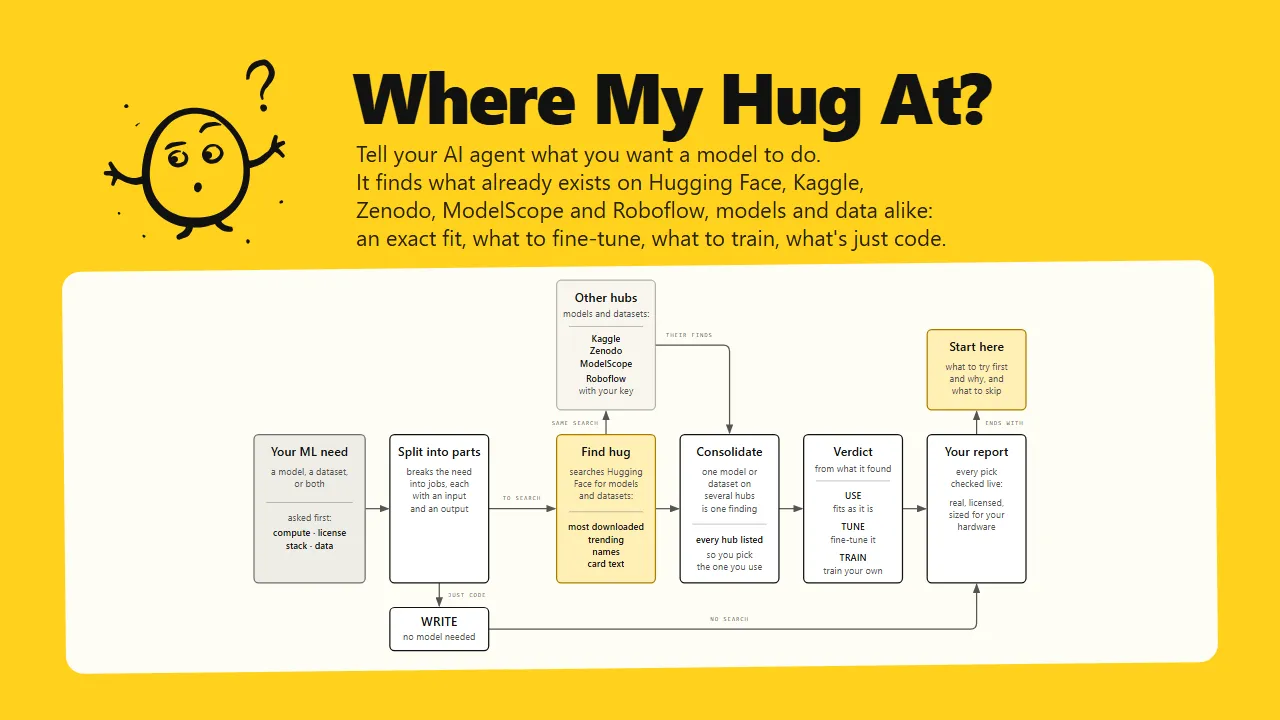
Ask an AI agent for a model that reads handwriting and you get whatever was popular when it was trained: often too big for your GPU, under a license you can’t ship, or in a format your code can’t load. Where My Hug At? makes the agent look first. Describe the job; the agent asks where it will run, what the license has to allow, what will call the model and what data there is, then splits the job into parts and searches for models and datasets for each. Hugging Face is searched four ways: most downloaded, trending, by name, and by what the cards say. The same search runs on Kaggle, Zenodo, ModelScope and, with a free key, Roboflow Universe, and a model or dataset found on several hubs comes back as one finding naming them all, so you take it from the one you use.
For each part it says whether to use a model as it is, fine-tune one, train one, or just write the code, because a model doing what code does exactly is a cost, not a feature. Every model and dataset in the report is looked up live moments before you see it: dropped if it isn’t there, flagged for license, gating and staleness, and sized against your hardware. The report ends with where to start: what to try first and why, and what to skip. Its mascot has its arms open, still waiting for its hug.
Its companion, Git for Me!, does the same for open-source repos on GitHub, GitLab and Codeberg.